@henryqw/pi-footer


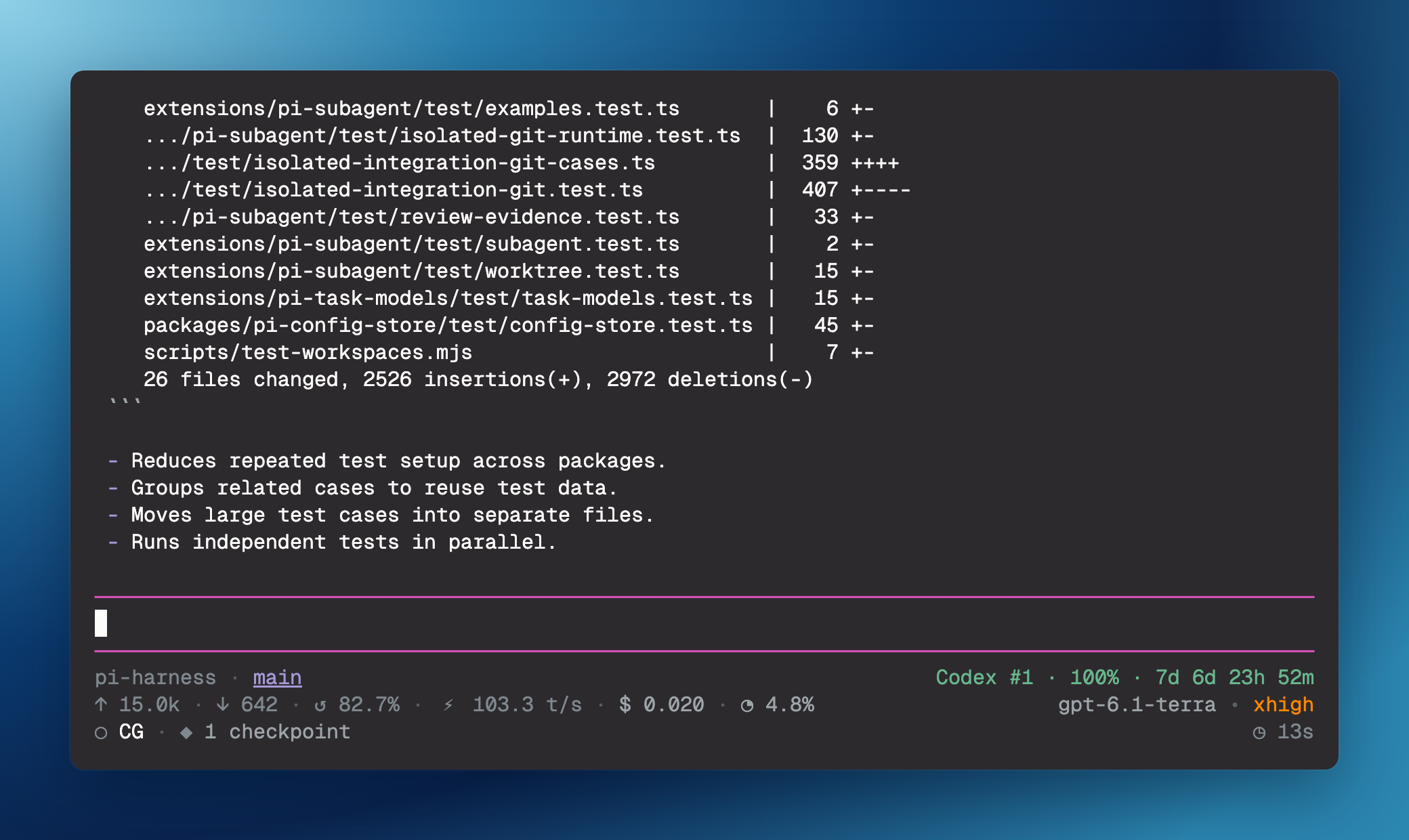
Keep footer identity, model usage, agent-work time, and extension status visible in Pi. Enable the footer and open commands independently.
Install
pi install npm:@henryqw/pi-footerBoth entry points load by default. To load only one, keep extensions/footer.ts (the footer) or extensions/open.ts (the open commands) with pi config or the package extensions filter in settings.json.
Works with
| Package | Relationship | Purpose |
|---|---|---|
@henryqw/pi-codegraph |
Improves | Shows CodeGraph index status, quiet setup progress, and direct tool activity when loaded. |
@henryqw/pi-multi-codex |
Improves | Adds active Codex subscription quota and reset status. |
@henryqw/pi-pr |
Improves | Adds current-branch pull-request status. |
@henryqw/pi-subagent |
Improves | Adds completed background workflow usage to the token and cost totals. |
Use
Start a Pi TUI session to see the footer. Run /open to open the current directory in VS Code, even while the agent is busy.
| Surface | Type | Purpose |
|---|---|---|
| Footer | ui | Shows footer identity, usage, model, agent-work time, and extension statuses to the user. |
/open |
command | Opens the current directory for the user: runs <command> <current-working-directory>. |
/set-open-in <command> |
command | Sets the user’s open command, such as cursor --reuse-window. |
Footer lines
| Line | Left | Right |
|---|---|---|
| First | Repository, branch, Git state, and pi-pr pull-request status. Linked-worktree branches omit the generated worktree/ prefix. |
Non-empty pi-multi-codex family status. |
| Second: usage line | Input and output token totals, latest cache-hit rate, response throughput, estimated cost, and context use. | Active model and thinking level. |
| Third | CodeGraph first, then other extension statuses sorted by key, including Ponytail and pi-rewind. |
Cumulative agent-work time. |
Token and cost totals include reported tool usage and completed pi-subagent background workflows. Response throughput measures output tokens per second from first to last streamed content. Non-streamed or instantaneous responses show —. Other unavailable values show — without a percent sign.
Virtual models show the latest successful physical model and thinking level after an arrow: auto • high → gpt-5.6-luna • medium.
Other dependency statuses, such as ⠋ deps · installing 12s, disappear after completion. Middle dots separate statuses.
Git state
Badges appear only when action is necessary:
| Badge | Meaning |
|---|---|
+2 |
Two staged paths |
~3 |
Three unstaged tracked paths |
?N |
N untracked porcelain status entries; Git can collapse an untracked directory into one entry. |
!1 |
One unresolved path |
↑2 |
Two commits ahead of upstream |
↓1 |
One commit behind upstream |
Active operations appear first: REBASE 3/7, MERGING, or CHERRY-PICKING. Detached HEAD shows a short commit, such as @a1b2c3d.
Git state refreshes after agent runs and branch changes. No model call or remote fetch occurs. Ahead and behind counts use the last fetched upstream state.
Config
Package-owned paths:
~/.pi/agent/config/pi-footer/config.json: footer colors.~/.pi/agent/config/pi-open-in/config.json: open command.
| Name | Description | Values | Default |
|---|---|---|---|
colors |
Footer-owned colors by role. | Object mapping roles to theme tokens, #RGB, #RRGGBB, oklch(...), okhsl(...), or ANSI indices 0 to 255. |
Built-in colors. |
command |
Command for /open. |
Non-empty string. | "code" |
Colors load at session start; run /reload after edits. A role with a missing or invalid color keeps its built-in color; other roles are not affected. A file problem gives all built-in colors. The footer never writes the colors file. For the shared rules, see Config files.
Footer color roles
Every role is optional:
| Role | Surface |
|---|---|
repository |
Repository name. |
branch |
Branch name, with a hyperlink where supported. |
gitStatus |
Git badges. |
input, output, cache, throughput, cost, context |
The six usage metrics. |
model |
Active and physical models. |
runtime |
Agent-work time. |
codegraphActive |
Direct-call ● CG badge. |
separator |
Middle dots, bullets, arrows, and truncation ellipsis. |
Theme tokens: accent, dim, muted, text, success, warning, error, and thinkingText. Colors do not change the thinking gradient or other extensions’ status colors.
{ "colors": { "branch": "accent", "cost": "#ce9178" } }API
Consumers must use the owner API, not read config directly.
| Surface | Type | Purpose |
|---|---|---|
default (openInExtension(pi)) |
function | Registers open commands without the footer. |
OpenInConfig |
type | Describes the command. |
loadOpenInConfig(agentDir?) |
function | Reads and validates owner config; accepts an optional agent directory. |
configuredOpenUri(path) |
function | Returns a safe VS Code URI for code, or undefined for other commands. |
Neither function shows notifications. For code -n and code --new-window, configuredOpenUri(path) adds windowId=_blank.
Limits and recovery
Open commands split on whitespace. Quoting and tokens with spaces are unsupported; use a wrapper script for executable paths with spaces.
/open reads config on each run. Only /set-open-in writes the file. An invalid command or a file problem uses code, and /open reports the problem. Fix the file or run /set-open-in <command>.
With code and Pi hyperlink support, the accent-colored branch name links to the current path. code -n and code --new-window open a new window. Other executables or disabled hyperlinks give plain text.
Use primary click in Pi’s default fullscreen TUI. Regular TUI ("tuiMode": "regular" or --tui-mode regular) needs terminal support for OSC 8 links and custom URI schemes. Ghostty uses Cmd+click, but might not open custom URI schemes.